
How do we use OpenSubtitles in the CloudStream app?
If you want to view content with subtitles, this app does not offer them. You can use other online sources like OpenSubtitles. To use it, you need to log in to OpenSubtitles website and connect your Cloudstream Video Player. When you play a video, it automatically find for and displays subtitles online.
How to use OpenSubtitles in the CloudStream app?
Open Subtitle is an amazing app that lets users create a free profile on their website without any charges. To connect Open Subtitle with Cloudstream, follow these instructions.
Step 01: Create an Account on opensubtitles and add the account to CloudStream
- Open the official OpenSubtitles website: https://www.opensubtitles.com
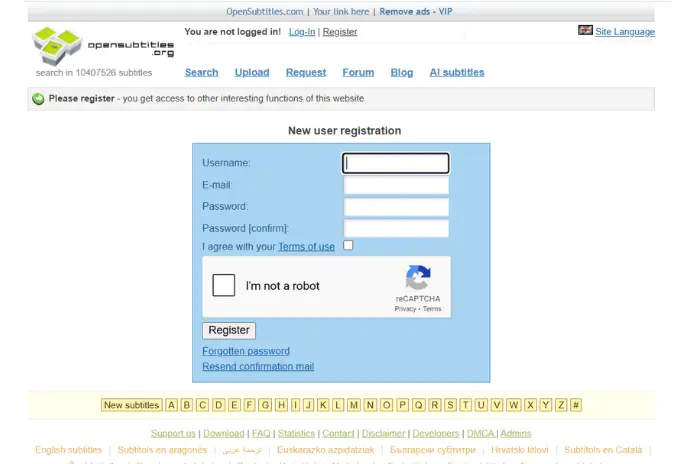
- If you don't have an account, please create one. To create a new account, follow the steps below.
- Press Register
- Include the username.
- Added password
- Clear captcha.
- login and check your account through a link you will receive in the provided email account.
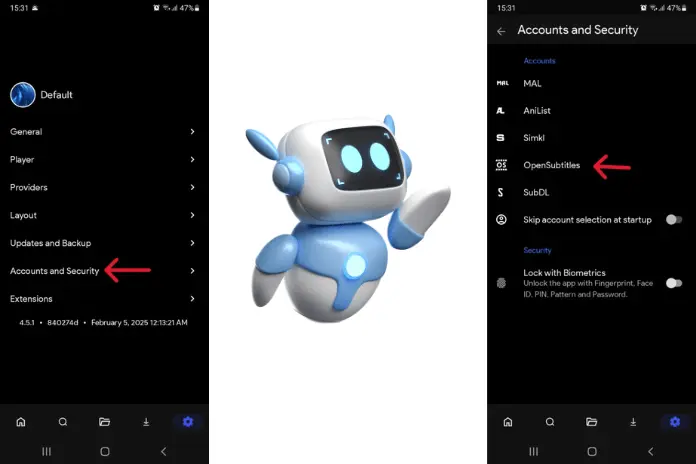
- Select login details to Include the opensubtitles account on cloudstream (Use details that you used creating account opensubtitles)
Step 02: How to use OpenSubtitles
- Play content as you Like
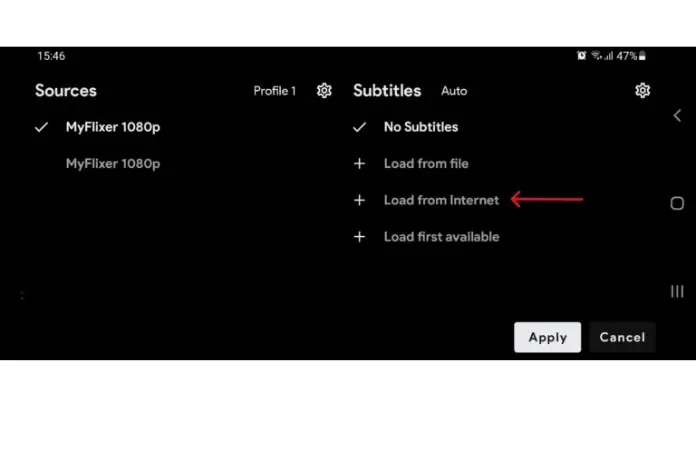
- Select on sources
- Press on the Load from Internet
- Now, subtitles will Appear few minites on your screen.
- Select your favourite subtitles.
How to customize subtitles in the CloudStream app?
- Move to settings in the app
- Press the player and Selection the subtitles option.
- Here you can view a list of customised options like Font, font size, outline color, text color, background color, window color, edge type, edge size, subtitles elevation, and much more.
- When you select any customised option, you can view the changes in the top window.
- After you select any customisation option, you can see the changes in the window.
- If you favorite any customisation option, click on the apply button to safe
- From here you can enjoy content with customized subtitles.
How to add/upload Subtitles to Cloudstream App?
From here you can upload your customized subtitles to the Cloudstream app. How can you do? Follow these steps below:
- Move to website link: https://www.opensubtitles.org/en/upload.
- Register are login your account
- Lets Related information about subtitles.
- Upload subtitles
- You can upload subtitles uder an anonymous profile
- Enter the CloudStream app.
- You have to wait for a At least of 2 hours, since the update takes time. (In our case, It was updated in 2 hours)
- You can select the “Load from file” option in CloudStream to upload subtitles
Cloudstream offers more access over the app with these function.Users can adjust the app or video settings to their preference to enhance their viewing experience. For example, users can still customize their experience and watch content on a large screen.
Frequently Asked Question
At times, subtitles are not available for that content. You can easily fix it by following
these Options :
- Select sources and ON subtitles
- If you already have a subtitle file, click on Load from File.
- Use a VPN to view the content.
Reload the Cloudstream app.
Move to the Sources option and choose “Load from the Internet” or “Load First Available.”
The Cloudstream app enables users to OFF subtitles while viewing their favourite content. You can do it any time while seeing the content. Just select the sources and press on the “no subtitles option”.